


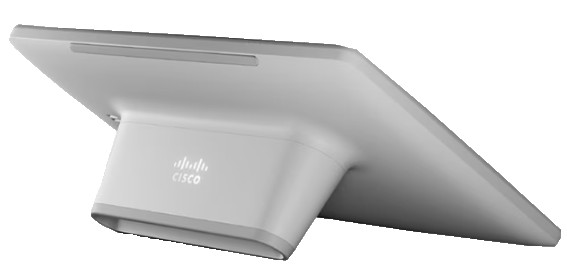
New, Cisco CS-T10-TS Room Navigator Video Conference Touch Controller v03, Teams
$ 121.43
Description
New, Cisco CS-T10-TS Room Navigator Video Conference Touch Controller v03, Teams. Discover the Cisco CS-T10-TS V03 Touch 10 Video Conferencing Unit, perfect for your meeting rooms. Brand new, unused, and sourced from VA Medical center surplus. Ships free, same or next day. Elevate your conferencing experience with this reliable unit. Discover the Cisco CS-T10-TS V03 Touch 10 Video Conferencing Unit, perfect for your meeting rooms. Brand new, unused, and sourced from VA Medical center surplus. Ships free, same or next day. Elevate your conferencing experience with this reliable unit. Brand new unit. Sourced from VA Medical center surplus. This is surplus equipment that was sourced during Covid, but never put into service prior to returning to office. The unit is brand new and unused, box opened for photos only. Feature Benefit Conference and room controls ● Brings intelligent room controls to Cisco room, board and desk device-enabled workspaces ● Optimized for an effortless user experience, the table version of the user interface can rotate 180 degrees when the device is tilted, allowing for two different viewing angles ● Optimized for an effortless user experience as native Cisco touch controller on RoomOS – start or join a meeting with ease, control the video system, change video layout, share content, check contact lists and directories, enable Cisco AI Assistant, and apply other in-call actions ● The user interface can be configured by admins to easily control room peripherals such as lighting, blinds, room dividers, and curtains ● In-room controls customization to extend the features and functionality available in Room Navigator, such as controlling lights, blinds and room amenities Room booking ● The table-stand controller can be configured to run the native Cisco Scheduler app for room booking ● When set up as a room controller, it features lightweight booking capabilities, blending space reservation with the core conference and room control functionality ● Enables calendar display, ad-hoc and ahead room booking, meeting extensions, reminders, and check-outs with a few taps on the touch screen ● Offers Webex hybrid calendar synchronization ● Beyond the native Cisco room booking solution, Room Navigator can run third-party, persistent web apps for room booking from space reservation and workspace experience solution providers ● The native Cisco room booking solution is license-free when paired with a Cisco video device ● Enables better resource utilization via feature like native ghost meeting-release Workspace intelligence ● Room Navigator comes with embedded environmental sensors to track temperature, humidity, and air quality in the room, which can be augmented with noise level and occupancy sensor metrics originating from the connected Cisco video device. ● Option to display real-time room temperature and indicate real-time occupancy on the Room Navigator to help employees and visitors find the right workspace and have a more seamless in-office experience (requires pairing with a video device). ● Sensor-driven insights are accessible in Control Hub via APIs and can be ingested to Cisco Spaces, third-party analytics dashboards and integrated workspace management solutions for workspace optimization and resource planning purposes Third-party applications ● Room Navigator supports running persistent web applications to enable third-party experiences from Appspace, UMA, and other ecosystem partners ● Web apps running on Room Navigator get access to specific RoomOS APIs to build custom integrations for room booking, wayfinding, space reservation and digital signage ● Supports the native Microsoft Teams Rooms Console or Microsoft Teams panel experience as part of the MTR-certified Cisco collaboration device portfolio. Unified management ● The touch controller can be fully cloud-managed in Control Hub providing advanced monitoring, configurations and analytics (in paired mode), alongside the rest of your Cisco collaboration device deployment. ● Flexibility to deploy the device in standalone mode or paired with a video endpoint. The standalone version delivers the same look and feel and a rich booking experience without the need to be associated with a Cisco collaboration device. ● Room Navigator can be configured either as a meeting room controller, a room booking device or in persistent web app mode. Users can select from default options when it is booted for the first time or can configure the device for the desired use case anytime ● Room Navigators deployed in standalone mode can easily scale their capabilities to paired mode and deliver the full experience, once the room is upgraded with a video device. Product specifications Table 2. Product specifications Specification Description Product compatibility ● Cisco Room Series ● Cisco Board Series (Board S Series, Board Pro Series, Board Pro G2 Series) ● Cisco Desk Series Software compatibility ● RoomOS 9.14.3 or later ● Microsoft Teams Rooms Console (certified) ● Microsoft Teams Panel (certified) Call-control compatibility ● Hosted: Controlled by codec, Cisco Unified Communications Manager 10.5.2 or newer, Webex Cloud ● Cloud: Webex Cloud Cisco Scheduler ● Integrates with O365, Exchange and Google Calendar through Webex Hybrid Calendar service (requires Webex activation) ● Ad-hoc and ahead space reservation with a few taps ● View all upcoming meetings from room calendar ● Check-in/check-out with automatic ghost meeting release ● Extend your meetings ● Touchless booking inside the room with Cisco AI Assistant ● Meeting reminders with single tap extension ● Support for ad-hoc spaces without calendar integration Third-party applications ● Native support for Microsoft Teams Rooms Console or Microsoft Teams panel experience ● Supports the usage of persistent web apps enabling third-party experiences ● Web apps running on Room Navigator get access to the meeting room sensors’ data and the Webex hybrid calendar to enhance custom integrations for wayfinding, room booking, and digital signage Default components ● Room Navigator touch panel (First Light or Carbon Black) ● Table stand (First Light or Carbon Black) Signaling protocols ● TCP/IP Display ● Capacitive touch LCD ● 10.1-inch diagonal ● Anti-glare and anti-fingerprint Resolution 1920 x 1200 Memory 4 GB Sensors ● Measures temperature, humidity, and air quality (TVOC). This is combined with general noise, ambient noise, and reverberation time (RT60) for room acoustics originating from built-in sensors in the Cisco video endpoints. ● Sensor values are accessible from RoomOS cloud APIs, displayed on the Control Hub dashboard and can be extracted to Cisco Spaces, third-party analytics and workspace management tools. ● Ambient Temperature for Control Hub analytics reporting. Operating Range 0°C to 35°C. Resolution 0.1°C. Accuracy ±2°C. ● Relative Humidity for Control Hub analytics reporting. Operating Range 20% - 90% RH. Resolution 1%. Accuracy ±10% RH. ● Air Quality Index (TVOC) for Control Hub analytics reporting. Operating Range 1-5 (1 = clean air). Resolution 0.1. Accuracy ±1. Language support English, Arabic, Catalan, Czech, Danish, Dutch, Finnish, French, German, Hebrew, Hungarian, Italian, Japanese, Korean, Norwegian, Polish, Portuguese-Brazilian, Russian, Simplified Chinese, Spanish, Swedish, Traditional Chinese, Turkish, Ukrainian Digital signage Configurable in Control Hub Physical dimensions (H x L x D) ● 2.8 x 9.53 x 6.42 in. (7.1 x 24.2 x 16.3 cm) ● Maximum height in vertical position 5.2 in (13.2 cm) ● Minimal height in lower position on the table: 3.85 in (9.77 cm) ● For more information, please consult the Room Navigator CAD drawings Weight 1.39lb (0.63kg) Power ● Power over Ethernet (PoE) 802.3af Class 0 ● 100-240VAC, 0.5A max, 50/60Hz ● Option to set up office hours for the Room Navigator helping with energy savings and extends the lifetime of the touchscreen where digital signage, booking, and wake-up on motion detection is activated. Interfaces ● 1x Ethernet (RJ-45) 100 Mbps for LAN (external network) or direct pairing ● 1x microUSB (service port) ● 1x factory reset pinhole Security ● Secure management using HTTPS and SSH protocols ● Password protection for IP administration ● Standards-based media encryption on all back-ends (Secure Real-time Transport Protocol [SRTP], using AES-128-GCM or AES-256-GCM) ● WPA3TM and WPA3-Enterprise with CCMP128 Wi-Fi ® security ● Password protection to access administration ● Network settings protection ● Support for 802.1x authentication protocol (either when the device is paired directly or remotely with the video endpoint) Ships Free Ships Same or Next Day!


