









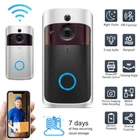
Smart WiFi Video Doorbell with Intercom and Security Camera
$ 21.12
Description
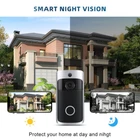
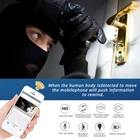
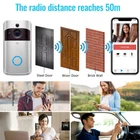
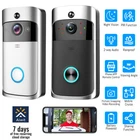
Doorbell Features: Rainproof: The doorbell can be installed outdoors, and you are no need to worry about it is drenched by rain. The video door intercom bell is support two way audio, When somebody push the doorbell or PIR detected alarm, your mobile app will receive an alarm video call directly, you can just answer the alarm call to see the video call directly from you mobile app and talk in real time. It is HD Resolution with 720p adopted cmos chipset. You may enjoy the excellent image full hd video and picture from this door bell for home surveillance security.Wireless doorphone doorbell camera is for apartment or back yard. It is not only a wireless intercoms doorbell fo r you, and it is also a security ip camera for your home. Multi functions that includes wireless, two way audio,motion sensor support both andriod and ios system of mobile. Support APP Function, it can be applied for Android, iphone, ipad APP Software. Support night vision and built-in IR-CUT technology, available day and night. Specification: Field of Angle View: 166° Material: ABS Size: 144x74.5x32.3mm Resolution: 1280*720 Field of Angle View: 140° IR LED: 6*850mm Wi-Fi: IEEE 802 11 b/g/n Audio: Two-way Talk With Noise Cancellation Recording: Device SD Card Recording(20 Seconds) Storage: 8G/16G/32G(Not Included) Monitoring: Device Button, Motion Detection, Remote Live View Notification Function: Push Notifications within 2 second Device Wakeup: Within 600 ms Power Consumption: Power Consumption Standby 200μA, Working 170mA Power Source: 3 x 18650 Specification Batteries(Not Included) Before You Start (Please fully charge before using the doorbell) 1. Download and install Aiwit App. Search for Wowcam on the Apple App Store or Google Play. Download and install the app. 2. Create an Aiwit account. Set up your device in the Wowcam app. To pair your device, follow the steps below and in-app instructions. 1. Open Aiwit App and log in to your account. 2. To add your camera, select the + icon. 3. Select Video Doorbell. 4. Press and hold the Doorbell Button until the red light is flflashing, tap Next, then tap Yes. 5. Enter your 2.4GHz Wi-Fi network and the Wi-Fi password, then tap Next (5GHz is not supported). 6. Use your device camera to scan the QR Code shown on the app, then select Confirm once the Wi-Fi setup has finished. WARNING : If your device is capturing an excessive number of events every day, you might need to recharge your battery sooner. Plus, the battery is also drained each time you use the Live View to look or speak through your doorbell. To prevent excessive events, you can adjust your motion settings to a lower sensitivity. Warm Tip: 1.this doorbell is use Aiwit APP,Before use ,it need download and install the app,not include chime. 2.Pleas confirm your Wi-Fi network is 2.4GHz , 5GHz is not supported 3.If you encounter any problems during use, please contact us , we will help you solve the problem. 4.Small store,small business, please do not leav e negative feedback at will , thank you very much! Note: There is a leak-proof gasket at the bottom of the battery, please remove it before use. Package Include d: (No battery included) 1 x WIFI Doorbell 4 x Screws 4 x Installing Accessories 1 x Wrench 1 x User Manual
Good quality product, well made and sturdy, will generate 150 watts over a 3 hour period, just not 150 watts instantly as you would expect a panel rated for that wattage to do. Product well packed, shipped quickly too. Good seller communication, thanks
Great seller, fast shipping, well packed, item as described, very good communication, thank you.
Great item, great price, good communication with seller, fast shipping!! Thank you.
Related products
Ring Video Doorbell with HD Video 720P, Motion Activated Alerts, Night Vision
$ 21.12Ring 1080HD Video Doorbell Pro with Night Vision Motion Alerts Alexa R8VRP60EN0
$ 57.6Ring Video Doorbell Bronze (1st Gen) 720p HD Video Motion Activated Alerts
$ 15.84Ring Doorbell 2nd Gen with HD Video 1080P, Motion Activated Alerts, Satin Nickel
$ 30.63